
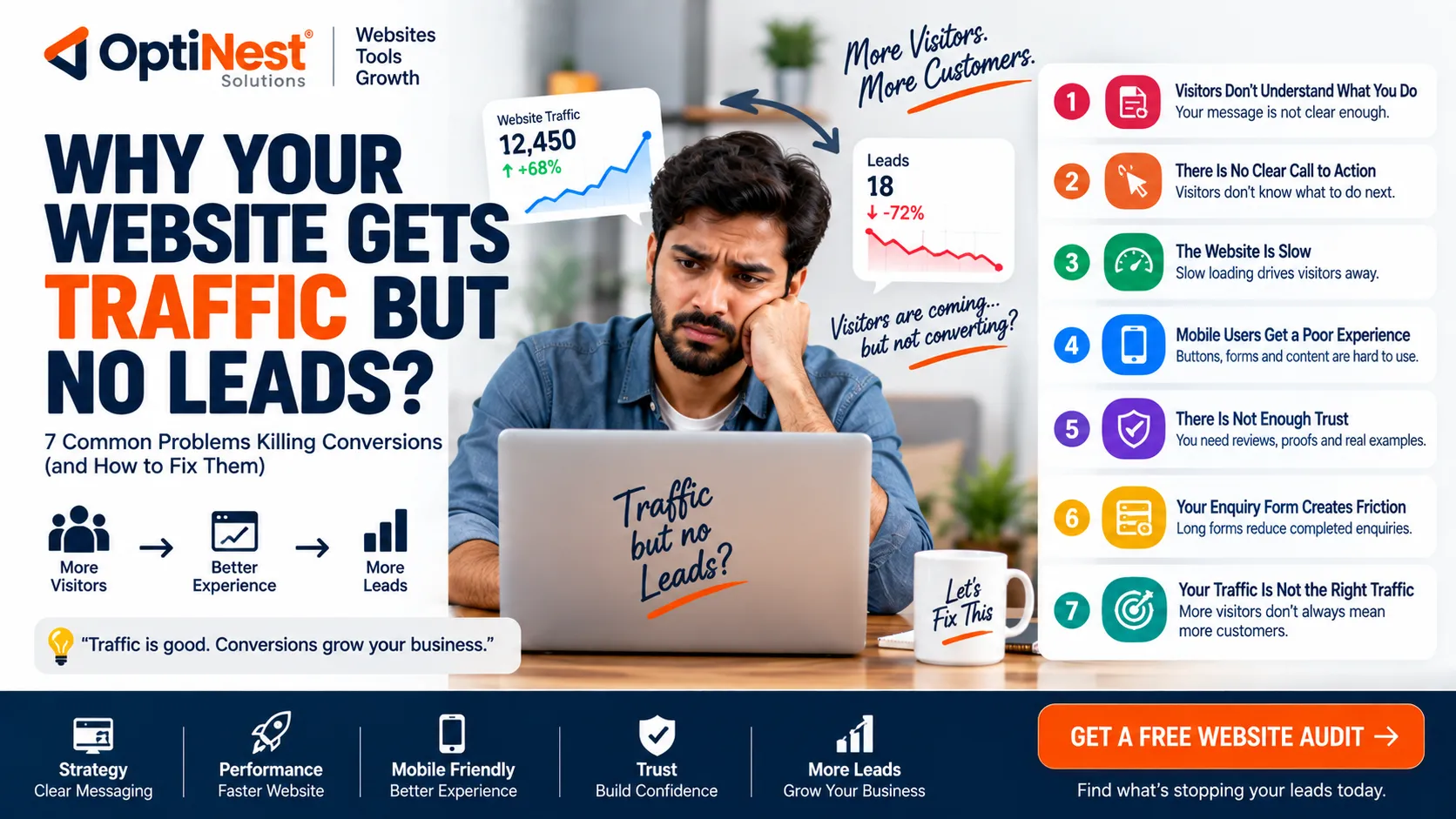
Why Your Website Gets Traffic but No Leads
Getting visitors to your website is only half the job. If people arrive, look around and leave without calling, messaging, booking or submitting an enquiry, the website is not doing its full business job.
A website can have good traffic and still generate very few leads because of problems with messaging, trust, speed, mobile experience, calls to action, forms or the overall customer journey.
Quick Check: Is Your Website Losing Leads?
❌ 1. Visitors Don’t Understand What You Do
Your homepage should quickly explain what you offer, who you help and why someone should contact you.
❌ 2. There Is No Clear Call to Action
Visitors may be interested but still not know whether to call, WhatsApp, request a quote or book a consultation.
❌ 3. The Website Is Slow
Large images, unnecessary scripts and poor hosting can create friction, especially on mobile connections.
❌ 4. Mobile Users Get a Poor Experience
Buttons, forms, menus and important information need to work comfortably on smaller screens.
❌ 5. There Is Not Enough Trust
Visitors need evidence that your business is genuine and capable before sharing their details.
❌ 6. Your Enquiry Form Creates Friction
Long forms and unnecessary questions can reduce completed enquiries.
❌ 7. Your Traffic Is Not the Right Traffic
More visitors do not automatically mean more customers. SEO needs to attract people who actually need your service.
1. Your Homepage Does Not Explain the Offer Quickly
A new visitor should quickly understand what you offer, who you serve and what they should do next. A vague headline may sound professional but fail to communicate the actual service.
- State the main service clearly.
- Identify the customer or industry you serve.
- Explain the main benefit.
- Place a clear action button nearby.
2. There Is No Strong Call to Action
Depending on the business, the primary CTA could be Get a Quote, Book a Call, WhatsApp Us, Request a Demo or Start Your Project.
Do not hide the CTA at the bottom of a long page. Important conversion actions should appear naturally throughout the customer journey.
3. Your Website Is Too Slow
A slow website creates friction before the visitor even reads your offer. Google recommends good Core Web Vitals as part of providing a strong page experience.
Common causes include oversized images, excessive scripts, inefficient code, third-party widgets and poor hosting configuration.
Easy first step: compress large images and use modern image formats where appropriate. The OptiNest Free Tools collection includes image compression, resizing and JPG/PNG/WebP conversion tools.
4. Your Mobile Experience Is Weak
A website may look excellent on desktop and still be difficult to use on a phone. Check for tiny text, hard-to-tap buttons, horizontal scrolling, intrusive pop-ups, slow loading and uncomfortable forms.
5. Visitors Don’t Trust the Business Yet
People do not automatically trust an unfamiliar company just because it has a website.
- Real testimonials
- Case studies
- Client or project examples
- Clear contact information
- Business details
- Relevant experience or certifications
- Transparent service information
6. Your Enquiry Form Is Too Complicated
A visitor who is ready to contact you should not have to complete a ten-field form just to ask a simple question. Ask only for information that is genuinely useful at the first stage.
If your business depends heavily on WhatsApp, make that option visible instead of forcing every visitor through a long form.
7. You’re Getting the Wrong Traffic
Traffic is not the same as demand. A web-development company may receive thousands of visitors searching for free templates and still generate almost no sales enquiries.
Your SEO and content strategy should attract people with problems your business can actually solve.
How to Find the Real Problem
| What you observe | Possible problem |
|---|---|
| High traffic + few enquiries | Weak offer, CTA or traffic quality |
| Visitors leave quickly | Poor relevance, slow page or unclear message |
| Many service-page visits | Check trust and conversion elements |
| Form starts but few submissions | Too much friction |
| Mobile traffic but few leads | Mobile UX or CTA problem |
Use Free Tools Before Paying for an Audit
You do not need an expensive software subscription to start checking and improving a website.
The OptiNest Free Tools collection includes image compression, image resizing, JPG/PNG/WebP conversion, developer utilities, a Meta Tag Generator, PDF tools and other useful utilities.
For example, compressing oversized images and converting them to an appropriate modern format can be a simple first step toward reducing page weight.
What About SEO?
SEO can bring qualified visitors, but SEO alone does not guarantee leads. Google recommends helpful, reliable, people-first content rather than creating pages simply to attract search traffic.
Your SEO strategy should match the business objective. Target searches from people who actually need your services—not just searches that happen to have high volume.
Simple Website Conversion Checklist
- Can a new visitor understand your service immediately?
- Is the main CTA obvious?
- Does the website work properly on mobile?
- Are important pages reasonably fast?
- Are large images compressed?
- Do visitors see genuine trust signals?
- Is the enquiry form short enough?
- Is WhatsApp or your preferred contact option easy to find?
- Are your SEO visitors potential customers?
- Do you measure enquiries, not just traffic?
When Should You Redesign Your Website?
A redesign is worth considering when the current website cannot clearly communicate your offer, performs poorly on mobile, is difficult to maintain, uses outdated technology or consistently fails to turn relevant visitors into enquiries.
But redesigning the website should not be the automatic answer to every conversion problem. Sometimes the better solution is improving the message, CTA, page speed, forms, SEO targeting or tracking.
Final Verdict
If your website gets traffic but produces few leads, don’t immediately assume you need more traffic.
First check the offer, CTA, speed, mobile experience, trust, enquiry process and traffic quality. Fixing one major conversion bottleneck can be more valuable than doubling your visitor count.
If the underlying website needs deeper development, SEO or conversion work, OptiNest Solutions can help businesses build and improve websites around real business goals.
Frequently Asked Questions
Why does my website get traffic but no enquiries?
The most common reasons are an unclear offer, weak calls to action, poor trust signals, slow or difficult mobile experiences, complicated forms or traffic that does not match your target customer.
Does more website traffic mean more leads?
No. Relevant traffic is more valuable than raw traffic. A smaller audience with strong purchase intent can generate more leads than thousands of visitors looking for something else.
Can website speed affect conversions?
Yes. Slow pages create friction and can cause visitors to leave before engaging with your offer.
How can I improve my website without redesigning it?
Start with the homepage message, CTA placement, image sizes, mobile layout, trust signals and enquiry form. These changes can sometimes produce meaningful improvements without rebuilding the entire website.
Are free website tools useful?
Yes. Free tools can help with specific tasks such as image compression, resizing, format conversion and SEO metadata.